


Aiseesoft Audio Converter for Mac 
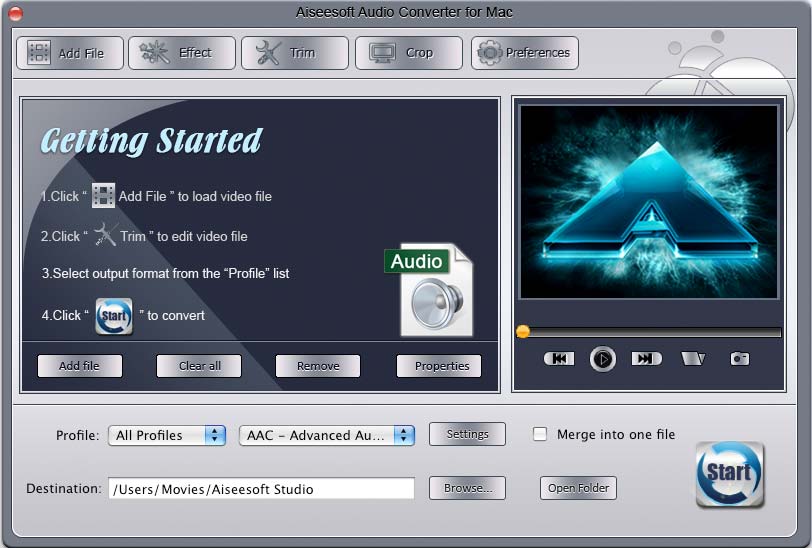
Aiseesoft Audio Converter for Mac is a professional audio converter for Mac and also an audio extractor for Mac. It can convert MP3, MP2, AAC, AC3, WAV, MID, MIDI, WMA, M4A, RA, RAM to MP3, AAC, AC3 and other mainstream audio formats with fast conversion speed. What’s more, it can also extract audio from video files. This audio extractor for Mac can extract audio from AVI, MP4, MOV, MKV, WMV, DivX, XviD, MPEG-1/2, 3GP, 3G2, VOB, etc. The best Audio Converter for Mac also enables you to edit your output audio file. So you can get a special audio effect and then enjoy a comfortable music trip as you like.
- Convert almost all audio files to MP3, AAC, AC3, etc
- Extract audio files from any video file
- Merge or split audio files
- Take snapshot
Get Windows Version: Audio Converter
- Key Functions
- Screenshot
- Reference
- New Version
- FAQ
 Extract audio from videos on Mac
It can extract audio from MPG, MPEG, MPEG 2, VOB, DAT, MP4, M4V, TS, RM, RMVB, WMV, ASF, MKV, AVI, 3GP, 3G2, FLV, SWF, MPV, MOD, TOD, QT, MOV, DV, DIF, MJPG, and MJPEG or convert them into MP3, AAC, AC3, etc.
 Get any audio clip as you like
Aiseesoft Audio Converter for Mac allows you to trim any segment of your audio through setting the start and end time.
 Output different formats at the same time
With this Mac Audio Converter, you can convert audios into different formats simultaneously.
 Snapshot
Capture your favorite pictures while you are previewing, then the images can be saved automatically.
 Adjust audio effects
To customize your audio effect by Setting the Audio Encoder, Sample Rate, Channels, Audio Bitrate.
 Fast converting speed and easy to use
This Audio Converter for Mac is quite easy for users, even the beginners. And the fastest conversion speed can help you enjoy a wonderful music trip.