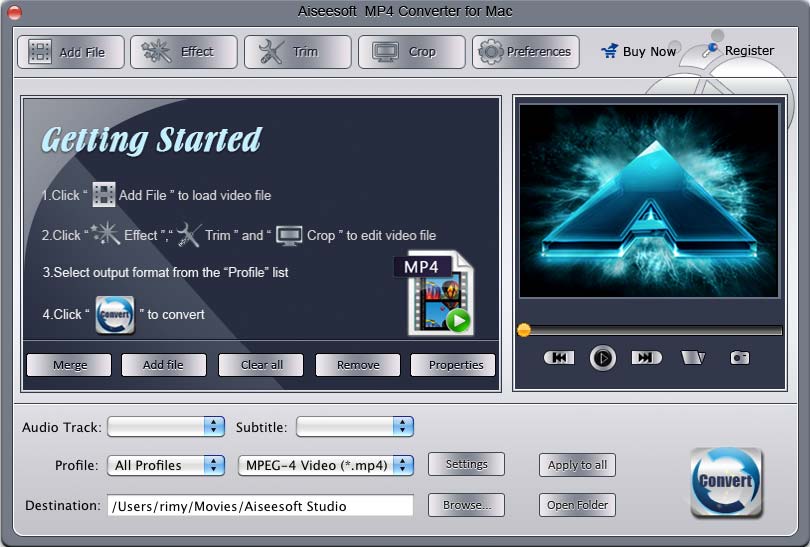



Aiseesoft MP4 Converter for Mac 
Aiseesoft MP4 Converter for Mac can convert all video formats (including MPG, MPEG, MPEG 2, VOB, DAT, MP4, M4V, TS, RM, RMVB, WMV, ASF, MKV, AVI, 3GP, 3G2, FLV, SWF, MPV, MOD, TOD and HD video) to MPEG-4, MOV, H.264 AVI, DivX, XviD with super fast conversion speed and high output quality, Aiseesoft MP4 Converter for Mac works well on MP4 Players, such as iPhone, iPod, Sony Walkman, Creative Zen, Apple TV, Nokia, PSP, Zune and so on.
- Convert videos to MP4 on Mac
- Select subtitles and audio tracks
- Output different formats with only one conversion
- Preview and snapshot
Get Windows Version: MP4 Video Converter
- Key Functions
- Screenshot
- Reference
- New Version
- FAQ
 Convert videos to MP4 on Mac
Aiseesoft MP4 Converter for Mac can convert MPG, Mod, TOD, MOV, MKV, WMV, DivX, XviD, MPEG-1/2, 3GP, 3G2, VOB, AVI, and HD TS, HD MTS, HD M2TS, HD MPG, HD MPEG, etc to MP4, MOV, AVI, and HD MP4, HD MOV, HD AVI on Mac.
 Support many popular devices
With this best MP4 Converter for Mac you can output videos for iPhone, iPod, Sony Walkman, Creative Zen, Apple TV, Nokia, PSP, Zune and so on.
 Output different formats at the same time
With this MP4 Converter for Mac, you can convert videos into different formats simultaneously.
 Preview
You can preview the effect of both the source file and converted video at the same time to see whether the effect can meet your need.
 Capture your favorite pictures
Take a snapshot of your favorite pictures while you are previewing, then the images can be saved automatically.
 Adjust video effects
MP4 Converter for Mac allows you to adjust video effects: Brightness, Contrast, Saturation and Audio volume to optimize your output video effects.
 Set output video and audio parameters
This MP4 Converter for Mac allows you to set video and audio settings, such as Resolution, Video Bitrate, Frame Rate, Audio Channels, Sample Rate, etc.
 Select audio track and subtitle
This professional Aiseesoft MP4 Converter for Mac enables you to choose the subtitle and audio track before you convert your videos.