



Aiseesoft Total Video Converter 
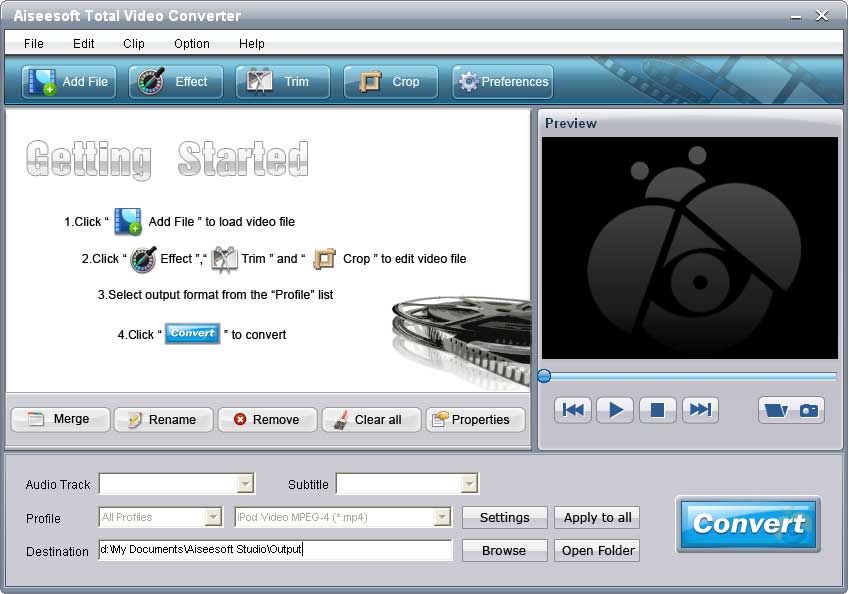
Aiseesoft Total Video Converter is the best video converter software that helps you convert video to MP4/MKV/WMV/AVI and other popular formats with high speed and excellent sound/image quality. In addition, the Total Video Converter can also extract audio from video file and convert them to M4A, MP3, AC3, AAC, WMA, WAV, OGG as you want. Besides, this Total Video Converter can help users edit video effect, such as trimming, cropping, merging, watermarking video and adjusting video brightness, saturation and contrast.
- Convert any video files
- Edit output video effect
- High converting speed
Get Mac Version: Video Converter for Mac

- Key Functions
- Screenshot
- Reference
- New Version
- FAQ
 Convert video files
Aiseesoft Total Video Converter offers powerful video functions. It can convert almost all video formats. Also it can extract audio files from videos.
 Output one file to different formats with one conversion
This Total Video Converter can convert one source file to several output video files simultaneously.
 Trim and crop video
Users can trim any video segment and crop video playing area.
 Merge video clips
Join several video clips together and output them to a single video file.
 Watermark video
You can add any text/image watermark to video frame and define its position and transparency.
 Adjust video effect
This Total Video Converter allows users to adjust video brightness, saturation and contrast.
- Numerous output settings
Aiseesoft Total Video Converter allows you to adjust Video Resolution, Video Bitrate, Frame Rate, Encoder and Audio Channels, Sample Rate, Encoder, and Audio Bitrate.
 Preview video effect
Users can preview video effect through the built-in player can capture video frame.
 User-friendly interface
The intuitive interface can bring users perfect user experience.

- How to transfer Music from iPod to Computer
- How to put Video on iPod
- How to download Limewire Video to iPod
- How to warch iPod Video on Large screen TV
- How to Create ringtone for a iPhone
- How to transfer iPhone to iPhone, iPhone to PC, PC to iPhone
- How to transfer iPod to iPod, iPod to PC, PC to iPod
- iPod Converter Reviews: how to convert video for iPod, iPhone,iPhone ringtone