 Current Page:
  Hot Products
 Mac Video Tools
  Mac Audio Tools
  Mac Discount Packs
  For Windows User
How to download Limewire Video to iPod
This guide is mainly about how to use limewire to download free music and video to computer, and then transfer limewire free music and video to iPod. It will include two parts as follow:
1. How to download free limewire video and music to computer?
2. How to put limewire free movie to iPod?
You can download limewire software free from its official site: http://www.limeware.com
If you want to download youtube video to iPod, Zune, PSP, you can refer to this step by step guide:
http://www.mac-dvd-video.com/how-to-download-videos-from-youtube.html
Part1. How to download free limewire video and music to computer?
1. Download Limewire, it’s totally free. http://www.limewire.com/download/version.php
2. Run the Limewire, Just type in some words that you may be interested in, choose the type, and press search, then you can get a lot of files to download.
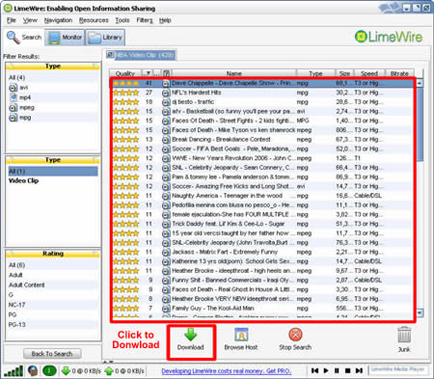
Find the just file and click download to get it. You can also download multiple files in one time.
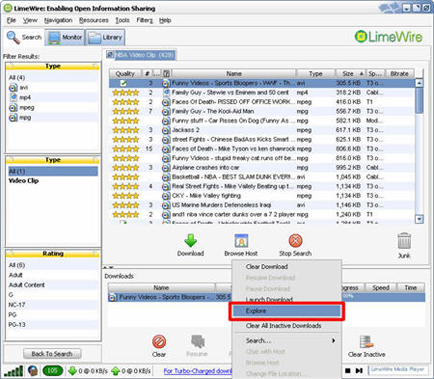
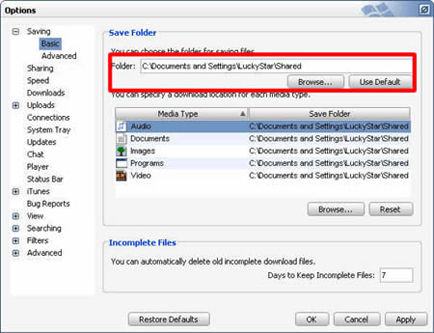
After you download the file, then right-click on the download file and choose “explore”, then you can find your file. You can also Option, then you can set the default downloaded directory. Click tool folder for saving your file.
Part2. How to put limewire free movie to iPod?
After you download video from limewire, because iPod can play only MP4 and H.264 video,
If your download videos are not compatible with iPod, you can use Aiseesoft iPod Movie Converter to convert it to MP4 for iPod. Follow these steps:
1. Download and install Aiseesoft iPod Movie Converter, you can free download the latest version from here: http://www.mac-dvd-video.com/ipod-movie-converter.html
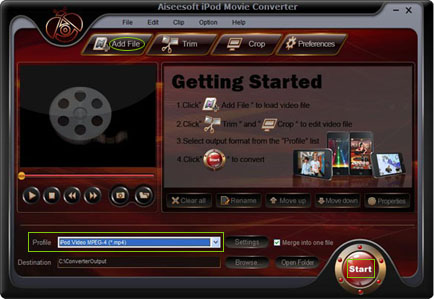
2. Run Aiseesoft iPod Movie Converter, click “Add” button to import your downloaded limewire videos, then click “Start” to start the conversion, the default setting works perfect.
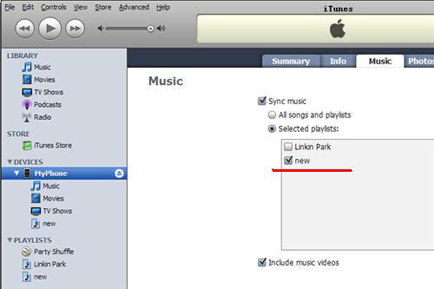
3. After conversion finished, use iTunes to transfer video to iPod:
1). Open iTunes and click "File" to add your videos to iTunes library.
2). Plug in your iPod to computer, then iTunes will detect your iPod as a device.
3). Select your iPod device on the left panel of iTunes, click "Movies" tab, check the videos you want to sync and click "Apply", done.
This guide is mainly about how to use limewire to download free music and video to computer, and then transfer limewire free music and video to iPod. It will include two parts as follow:
1. How to download free limewire video and music to computer?
2. How to put limewire free movie to iPod?
You can download limewire software free from its official site: http://www.limeware.com
If you want to download youtube video to iPod, Zune, PSP, you can refer to this step by step guide:
http://www.mac-dvd-video.com/how-to-download-videos-from-youtube.html
Part1. How to download free limewire video and music to computer?
1. Download Limewire, it’s totally free. http://www.limewire.com/download/version.php
2. Run the Limewire, Just type in some words that you may be interested in, choose the type, and press search, then you can get a lot of files to download.
Find the just file and click download to get it. You can also download multiple files in one time.
After you download the file, then right-click on the download file and choose “explore”, then you can find your file. You can also Option, then you can set the default downloaded directory. Click tool folder for saving your file.
Part2. How to put limewire free movie to iPod?
After you download video from limewire, because iPod can play only MP4 and H.264 video,
If your download videos are not compatible with iPod, you can use Aiseesoft iPod Movie Converter to convert it to MP4 for iPod. Follow these steps:
1. Download and install Aiseesoft iPod Movie Converter, you can free download the latest version from here: http://www.mac-dvd-video.com/ipod-movie-converter.html
2. Run Aiseesoft iPod Movie Converter, click “Add” button to import your downloaded limewire videos, then click “Start” to start the conversion, the default setting works perfect.
3. After conversion finished, use iTunes to transfer video to iPod:
1). Open iTunes and click "File" to add your videos to iTunes library.
2). Plug in your iPod to computer, then iTunes will detect your iPod as a device.
3). Select your iPod device on the left panel of iTunes, click "Movies" tab, check the videos you want to sync and click "Apply", done.
Articles
- How to Download Videos from YouTube
- How to Transfer Music from iPod to Computer
- How to put Video on iPod
- How to convert .Mod files
- How to convert Videos
- Convert Video for Sansa Fuze
- How to convert YouTube video files to PSP
- Convert Video to MP4 on Mac
- How to download Limewire Video to iPod
- How to watch iPod Video on large screen TV
- Learn More Article and Guide

Latest News
partner