



Aiseesoft Mod Video Converter 
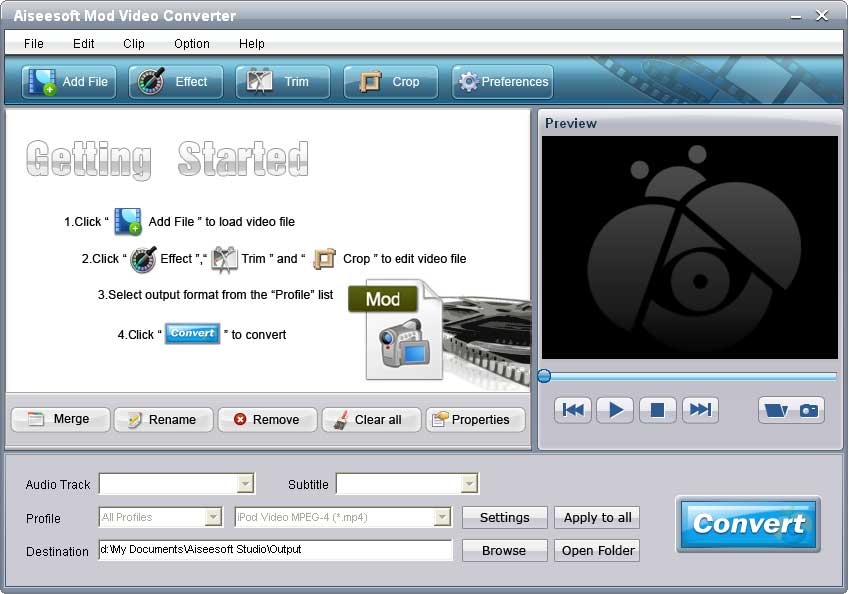
Aiseesoft Mod Converter is the First and Powerful Mod Converter software which can convert MOD, TOD, MPEG, MPG, MPV, MP4, VOB files to all popular video and audio formats. The Mod Converter can convert the .mod files recorded by most popular digital camcorders such as Panasonic SV AV100, Canon MOD Camcorders, JVC (MOD and TOD) and Panasonic (MOD only) to all popular video formats then enjoy it on your computer, iPod, iPod touch, iPod nano, iPhone, PSP, Zune, Creative Zen and other Portable Devices.
- Convert Mod to other video files
- Trim, crop, merge and watermark video
- Output one file to different formats
- High converting speed

- Key Functions
- Screenshot
- Reference
- New Version
- FAQ
 Convert Mod files
Aiseesoft Mod Video Converter enables users to convert Mod file to all popular video and audio formats. Also this software support TOD, MPEG, MPG, MPV, MP4, VOB, etc. input formats.
 Trim and merge video clips
With this software, users can conveniently trim any video clips by setting the start and end time, and join video clips together.
 Crop and watermark video
You can adjust video playing area, define video aspect ratio and watermark your video in the form of text or image.
 Define output settings
You can define Video Resolution, Video Bitrate, Frame Rate, Encoder and Audio Channels, Sample Rate, Encoder, Audio Bitrate to get customize video file.
 Batch conversions
You can convert one source file to different output formats with only one conversion.
 High speed
The Mod Video Converter is easy to use and users can experience a super high converting speed.

- How to transfer Music from iPod to Computer
- How to put Video on iPod
- How to download Limewire Video to iPod
- How to warch iPod Video on Large screen TV
- How to Create ringtone for a iPhone
- How to transfer iPhone to iPhone, iPhone to PC, PC to iPhone
- How to transfer iPod to iPod, iPod to PC, PC to iPod
- iPod Converter Reviews: how to convert video for iPod, iPhone,iPhone ringtone