



Aiseesoft iPad Converter Suite for Mac 
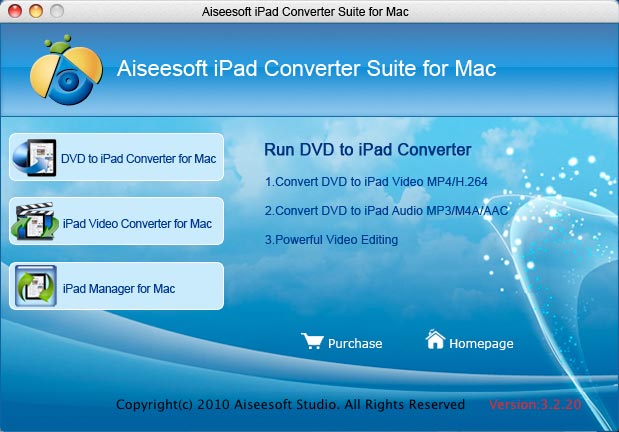
Aiseesoft iPad Converter Suite for Mac combines with iPad Video Converter for Mac, and Aiseesoft iPad Manager for Mac. iPad video converter for Mac can convert all the videos to multiple devices supported formats. In addition, iPad Manager for Mac can both backup iPad audio, video, image files to Mac and import audio, video folders, photos to your iPad. With this best iPad Converter Suite for Mac, you can do a lot of video editing works, such as trimming a clip of video, cropping video size, adding watermark and merging several video files into one file.
- Convert all the popular video and audio formats to iPad on Mac
- Support all generation of iPad/iPod/iPhone
- Complete several outputs at the same time
- Key Functions
- Screenshot
- Reference
- New Version
- FAQ
 Convert videos to iPad on Mac
Work as an iPad Video Converter for Mac to convert all the popular video and audio formats to iPad suitable formats.
 Output one file to different formats at the same time
This Aiseesoft iPad Converter Suite for Mac enables you to get several formats by converting one time.
 Merge into one file
Merge two or more files you choose into one output file.
 Do all video editing
Trim video, crop video and adjust video effect to fulfill your requirement, for example, video Brightness, Contrast, Saturation, subtitle, audio track.
 Set detailed video and audio parameters
Detailed video and audio settings are provided by this best Mac iPad Converter Suite for you to adjust, such as Resolution, Video Bitrate, Frame Rate, Audio Channels, Sample Rate, etc.
 Super conversion speed
Provide the fastest conversion speed (>400%), completely support Intel and Powerful PC CPU.

- How to transfer Music from iPod to Computer
- How to put Video on iPod
- How to download Limewire Video to iPod
- How to warch iPod Video on Large screen TV
- How to Create ringtone for a iPhone
- How to transfer iPhone to iPhone, iPhone to PC, PC to iPhone
- How to transfer iPod to iPod, iPod to PC, PC to iPod
- iPod Converter Reviews: how to convert video for iPod, iPhone,iPhone ringtone